Raccoon AI Slides Builder
Create professional presentations in minutes. From pitch decks to reports, Raccoon AI transforms your ideas into polished slides.
Curated examples of what you can create
Quarterly Review
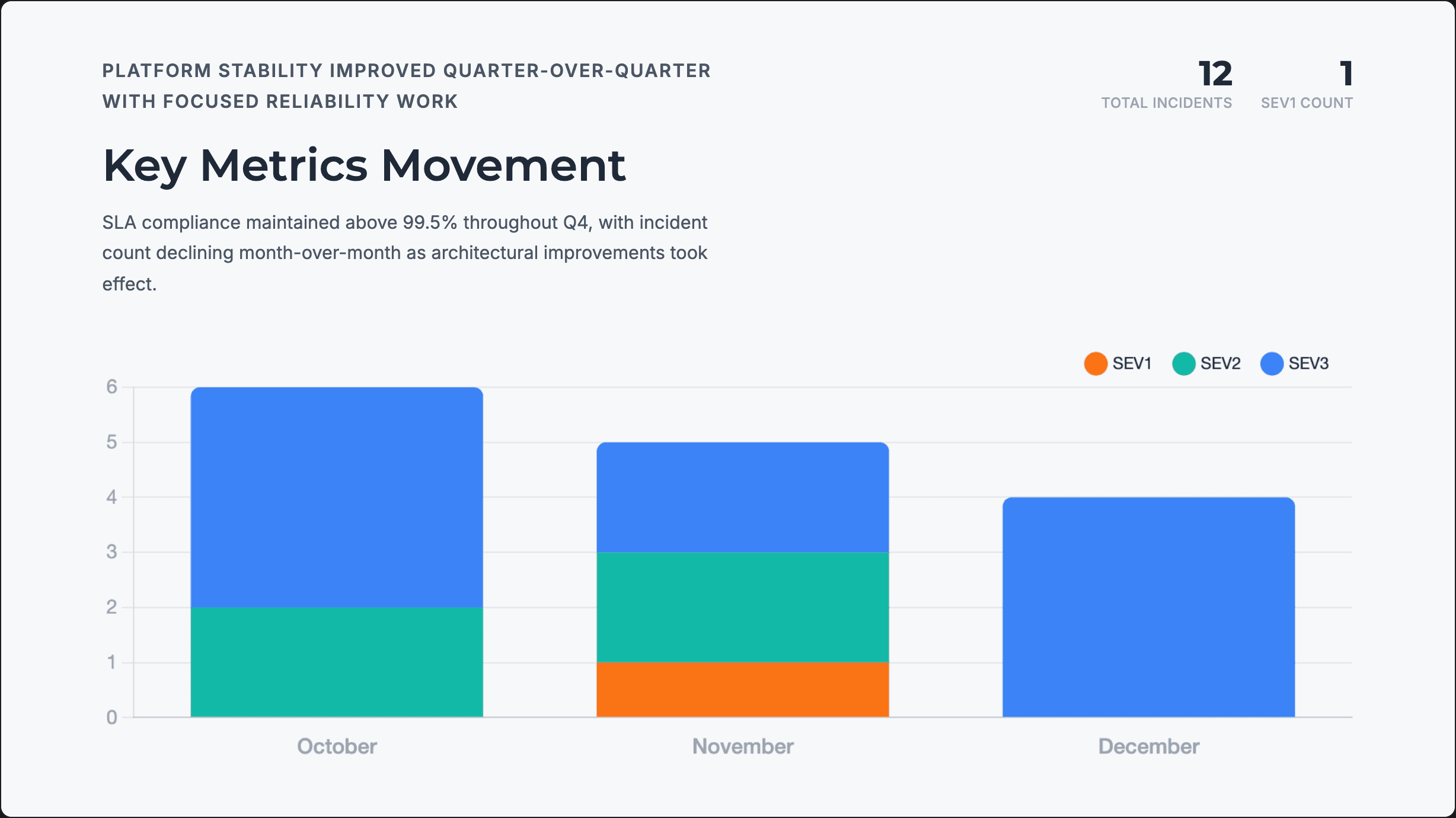
Data-driven engineering review presentation with reliability metrics, incident analysis, architectural changes, and next quarter priorities for leadership.
Annual Report
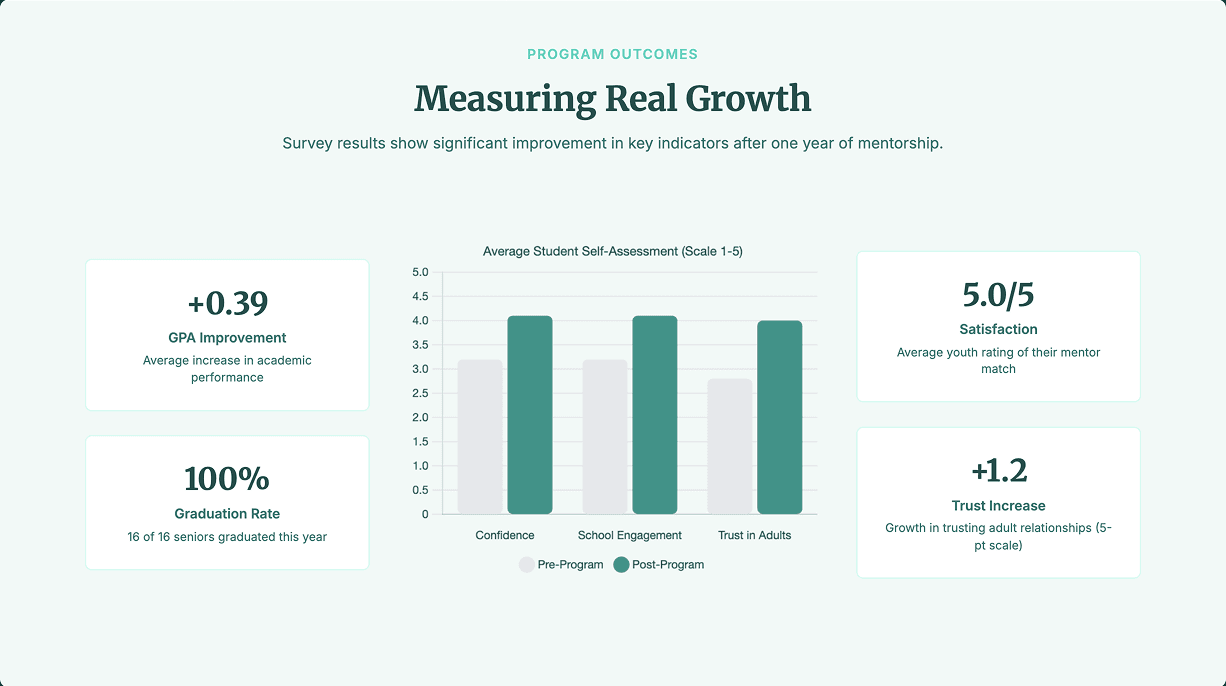
Board meeting presentation for youth mentorship program covering outcomes, financials, donor recognition, and strategic needs for the year ahead.
Classroom Lesson
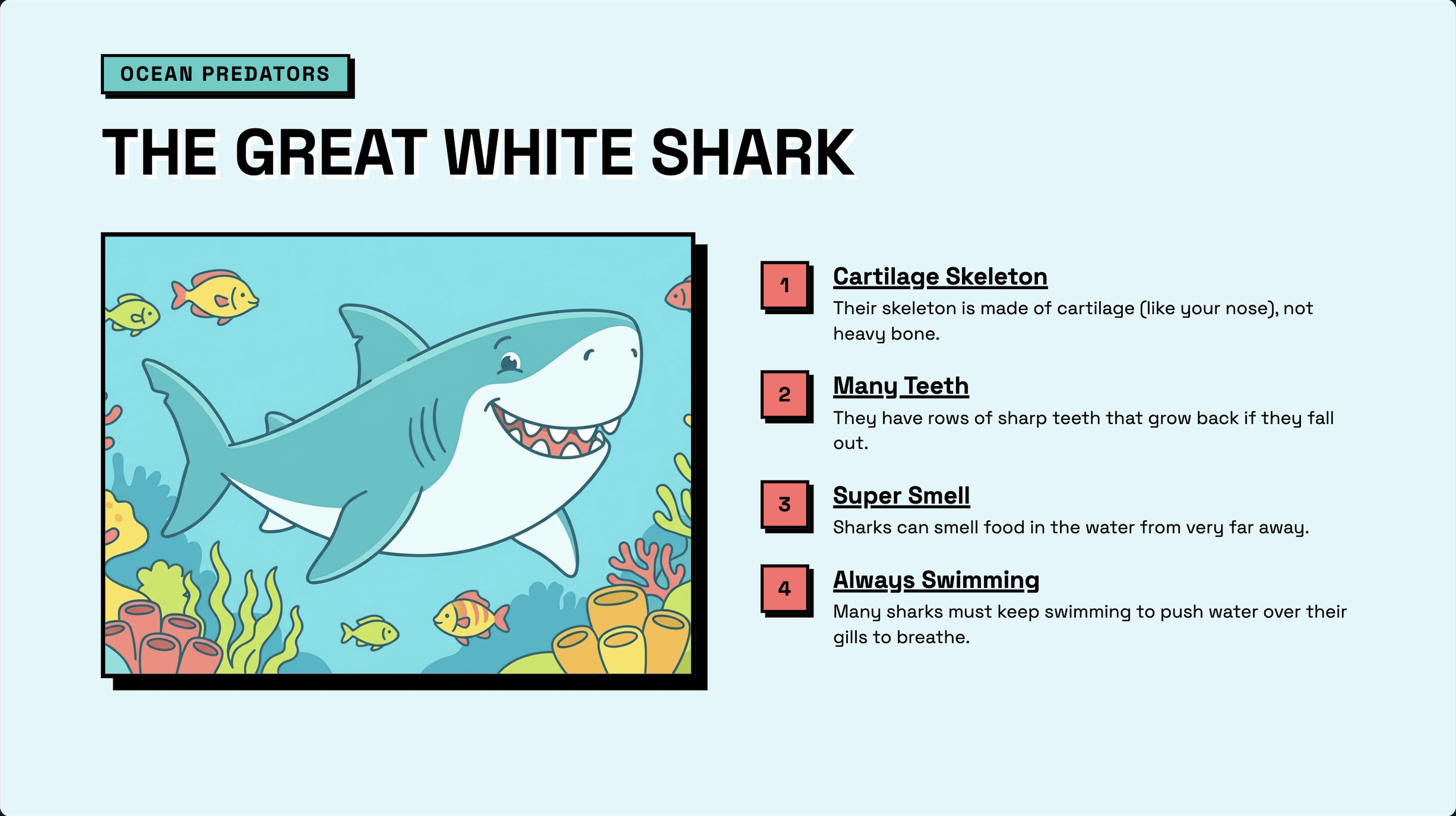
Interactive educational slides for elementary students featuring ocean creatures with AI-generated illustrations, key facts, and a matching game activity.
How to create stunning slides with Raccoon AI
Start with your prompt
Describe what you're creating and who it's for. Include your topic, audience, the key message you want to land, and how you'd like the presentation structured: number of slides, sections, level of detail.
Attach your source materials
Upload the data, documents, and references that should shape your content. Raccoon AI pulls insights directly from your files to build slides grounded in your actual information, not generic filler.
Create a quarterly engineering review deck for our VP based on the data from Datadog, Confluence, and JIRA. Keep it data-dense but exec-friendly. Cover the following: 1. Metrics movement 2. Top incidents and learnings 3. Architecture changes 4. Team capacity 5. Tech debt status 6. Next quarter priorities
 metrics_error_rate_q4_2024.csv
 incidents_q4_2024.json
Watch your slides come together
Raccoon AI analyzes your inputs, structures your narrative, and designs each slide with a consistent design. You'll see the presentation take shape in real time.
Production-ready output
What you get is fully styled and formatted presentation, ready to present as-is. View it in your browser, download it, or export to your preferred format.
Polish and Fine-tune
Your presentation is ready to use, but iteration helps you get it exactly the way you want it. Ask Raccoon AI to adjust a layout, sharpen a headline, add a section, or rework the narrative entirely.
Specific requests get better results
Instead of "make it better," try "break down incident response times by severity" or "add a visual comparing debt paid down vs. added." The more precise your ask, the more precise the output.
This is where decks get great
Most strong presentations go through a few rounds. Incorporate stakeholder feedback, add slides for questions that came up, adjust depth for different audiences. Each iteration sharpens the result.
Make the key metrics pop-out with bigger and bolder font.
Pro tips for best results
Set your quality bar upfront
Include standards in your initial prompt: "one key takeaway per slide," "charts should be self-explanatory," "keep text minimal." These guide the output from the start rather than requiring fixes later.
Show rather than describe
A screenshot of a slide layout you like communicates more than three paragraphs describing it. Visual references are faster for you to provide and more accurate for Raccoon AI to interpret.

Frequently asked questions
Creating professional presentations has never been easier. Our AI-powered slides builder helps you generate pitch decks, business presentations, and educational content in minutes. Below are answers to common questions about using Raccoon AI for creating presentations.
Have more questions or looking for a different solution? Contact sales
Raccoon AI can create startup pitch decks, sales presentations, business reviews, training slides, marketing presentations, product demos, project proposals and more. From simple slide decks to professional presentations with charts, graphs, and infographics-it handles them all.
Yes! You can upload brand guidelines, specify color schemes, and provide design references. Raccoon AI will match your visual identity while creating the slides and ensure they are consistently applied across all the slides.
Most presentations are ready in minutes. Simple decks can be generated in under a minute, while complex presentations with research and data analysis may take 3-5 minutes.
Absolutely! All slides are generated available in HTML format which can be exported directly to Google Slides or PPTX format for further changes. You can also ask Raccoon AI to make specific changes or refinements.
Slides are available as HTML, PPTX and PDF files. They can also be exported to Google Slides or you can import the PPTX into your presentation software.
Yes! Upload PDFs, Word documents, notes, or any reference material and Raccoon AI will transform them into polished slides. It can also research and analyze data from the web to design slides with up-to-date information.