Raccoon AI Data Analyst
Transform raw data into actionable insights. Raccoon AI analyzes spreadsheets, creates visualizations, and generates comprehensive reports.
Curated examples of what you can create
Inventory Planning
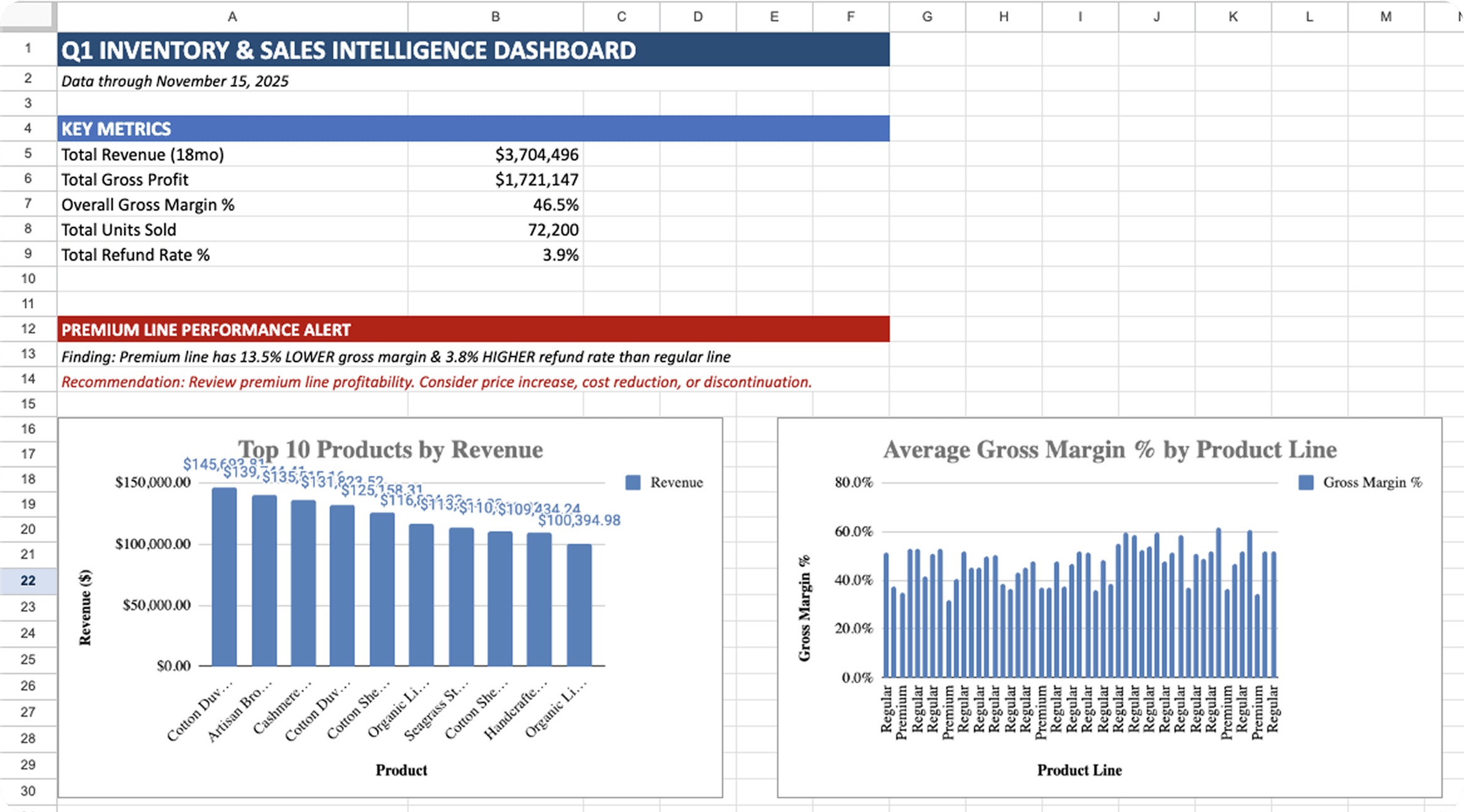
Excel workbook for e-commerce inventory decisions covering product performance, stock health metrics, seasonal patterns, and automated reorder calculations for Q1 planning.
Channel Analytics
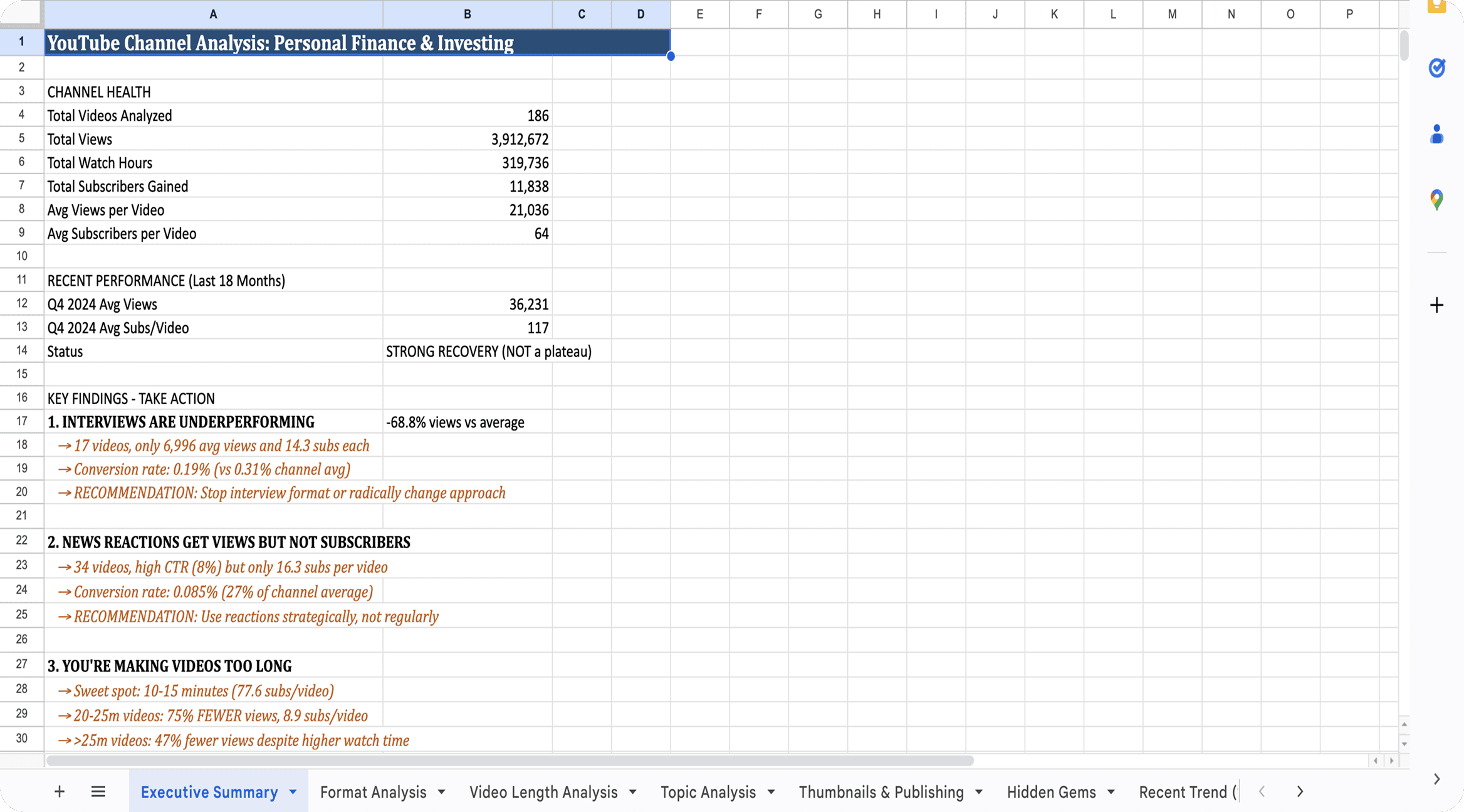
Comprehensive channel analysis workbook covering format performance, watch time patterns, thumbnail effectiveness, and hidden gem identification for content strategy.
Product Requirements
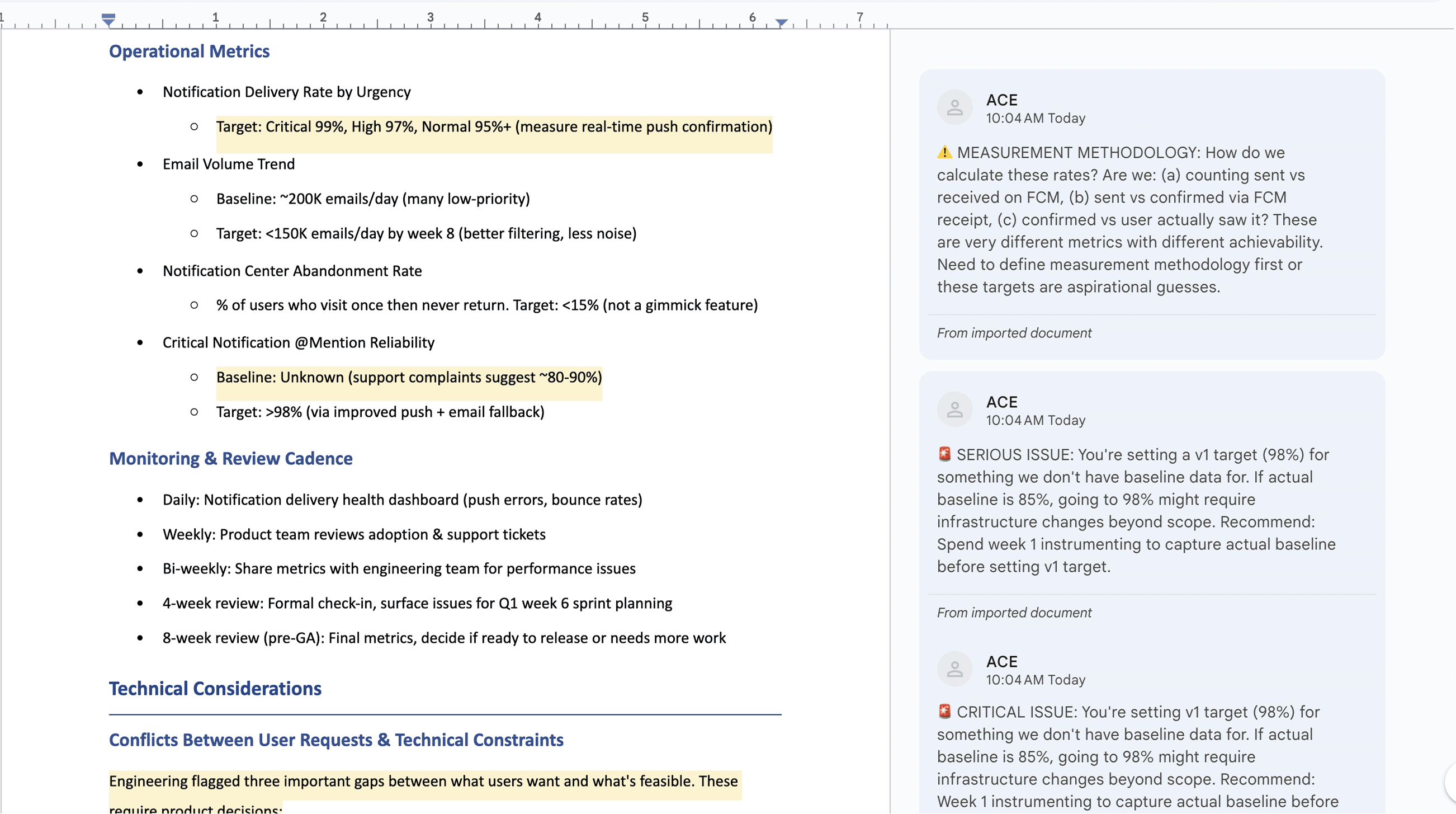
Complete product requirements document synthesizing user research, competitive analysis, and technical constraints into actionable user stories with acceptance criteria.
How to analyze data with Raccoon AI
Start with your prompt
Describe what you need to learn from your data and what decisions it should inform. Be specific about the questions you want answered, the metrics that matter, and how you want the output structured.
Attach your data files
Upload the spreadsheets, exports, and documents that contain your data. Raccoon AI pulls insights directly from your files to build analysis grounded in your actual numbers, not generic templates.
I want to make smarter inventory decisions for my home goods store on Shopify. Create an excel dashboard after analyzing the sales data. Include: - Product performance - Inventory health - Seasonal patterns - Customer geography Use landed cost for margins and flag SKUs with missing cost data.
 shopify_orders_export.csvcurrent_inventory_levels.csv
Watch your data come alive
Raccoon AI processes your data, identifies patterns, and builds the analysis you requested. You'll see charts forming, calculations running, and insights emerging in real time.
What you get
Raccoon AI generates all the needed deliverables: formatted workbooks, labeled charts, and written insights ready to share with stakeholders or use for decisions.
Dig deeper
Your analysis is ready to use, but you can explore deeper into certain topics or adjust the output to exactly what you need. Ask Raccoon AI to drill into a segment, add a visualization, or reframe a finding.
Specific requests get better results
Instead of "analyze this more," try "break down margins by product category" or "add a chart showing seasonal trends for the top 10 SKUs." Pointing out specific areas helps Raccoon AI focus on exactly what you need.
This is where analysis gets powerful
Initial analysis answers your stated questions. Follow-ups uncover what you didn't know to ask. Many of the most valuable insights come from exploring unexpected patterns in round two or three.
Add charts to show revenue distribution by cities and districts as well.
Pro tips for best results
Set your quality bar upfront
Include standards in your initial prompt: "flag statistical outliers," "include sample sizes with percentages," "show confidence ranges for projections." These guide the analysis from the start rather than requiring fixes later.
Context makes analysis smarter
If certain months are anomalies, if a product line launched mid-year, if you changed pricing: mention it. Raccoon AI interprets data better when it understands your business context.
Ask for the "so what"
Request actionable conclusions, not just charts. "Tell me what to do about slow-moving inventory" gets you further than "show me inventory turnover rates."

Frequently asked questions
Transform your raw data into actionable insights with AI-powered analysis. Our intelligent data analyst handles everything from statistical analysis to predictive forecasting, working with CSV, Excel, and database files. Discover how Raccoon AI can help you make data-driven decisions faster.
Have more questions or looking for a different solution? Contact sales
Raccoon AI supports CSV, Excel (XLSX), JSON, SQL databases, and API connectors. You can upload files or connect to live data sources.
Yes! Raccoon AI can process datasets with millions of rows, performing complex analysis and creating visualizations efficiently.
Statistical analysis, trend detection, forecasting, clustering, correlation analysis, anomaly detection, and custom calculations based on your needs.
Yes! The complete analysis process happens live with details about the methods used. Scripts and supporting files are available in your workspace, and you can ask Raccoon AI to explain its methodology or prepare supporting documentation.
Absolutely! Raccoon AI can create charts and visualizations, run statistical tests (regression, ANOVA, correlation), detect outliers and anomalies, clean messy data, and generate forecasts and much more.